

Evidence Acquisition Data Flow in AIR
This article explains how AIR creates, stores, transfers, and displays evidence acquisition data and DRONE analysis findings when an online Responder completes an Acquisition Task. It also explains what evidence.zip, case.ppc, and Drone.zip contain and how they differ.
Overview
Section titled “Overview”When an online Responder completes an Acquisition Task, it stores the collected evidence in evidence.zip. Depending on the task configuration, this archive either stays on the endpoint or is uploaded to an Evidence Repository.
The Responder also generates case.ppc and, if enabled, Drone.zip. When the task finishes, both files are automatically sent to the AIR Console and stored on its local disk until the task is deleted.
evidence.zip, case.ppc, and Drone.zip
Section titled “evidence.zip, case.ppc, and Drone.zip”What is evidence.zip?
Section titled “What is evidence.zip?”evidence.zip is the main evidence package that the Responder generates after the Acquisition Task is completed.
- It contains the collected evidence files defined by the acquisition profile.
- It also contains the
case.ppcandDrone.zipfiles.
What is case.ppc?
Section titled “What is case.ppc?”case.ppc is a compressed file that contains a SQLite database named Case.db. It stores information about all collected evidence and selected parsed forensic data that AIR can use directly.
- It contains evidence metadata and parsed artifacts that are forensically valuable or frequently used.
- It does not contain all raw evidence files. For example, raw evidence such as Memory Dump or MFT Dump files is not stored in it.
What is Drone.zip?
Section titled “What is Drone.zip?”Drone.zip is created when the task has the DRONE Analyzer or MITRE ATT&CK Analyzer enabled.
- It contains the results of the selected analyzers, including a SQLite database named
Drone.db.

Evidence Acquisition Data Flow: evidence.zip content example
The Content folder holds the collected evidence, while Case.ppc and Drone.zip are stored alongside it.
End-to-End Data Flow
Section titled “End-to-End Data Flow”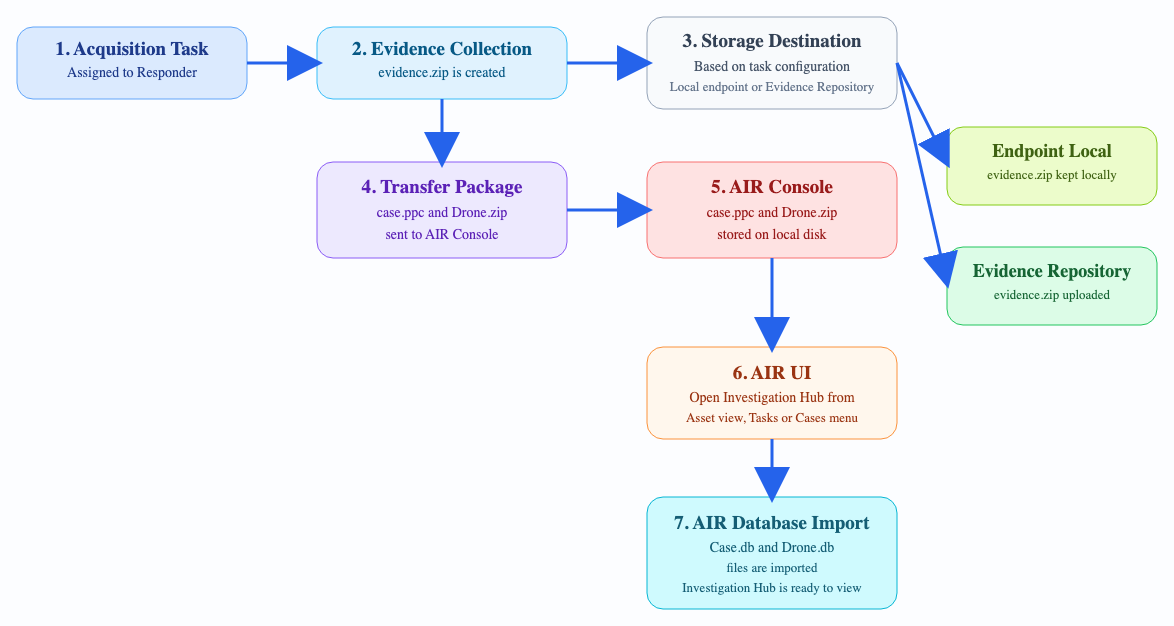
Evidence Acquisition Data Flow: End-to-end data flow
evidence.zip remains at the configured evidence destination, while case.ppc and Drone.zip are automatically transferred to the AIR Console for reporting and Investigation Hub display.
Detailed Workflow
Section titled “Detailed Workflow”Step 1: Acquisition Task Is Assigned to the Responder
Section titled “Step 1: Acquisition Task Is Assigned to the Responder”When the Acquisition Task is assigned, the TACTICAL component starts collecting evidence according to the acquisition profile and stores the results in evidence.zip.
Step 2: case.ppc Is Generated
Section titled “Step 2: case.ppc Is Generated”TACTICAL generates case.ppc, which contains Case.db, information about the collected evidence, and selected parsed forensic artifacts that are useful for analysis.
Step 3: Drone.zip Is Generated When Analyzers Are Enabled
Section titled “Step 3: Drone.zip Is Generated When Analyzers Are Enabled”If the task has the DRONE Analyzer or MITRE ATT&CK Analyzer enabled, DRONE analyzes Case.db and the endpoint’s live system, then generates Drone.zip, which contains Drone.db and the related analysis results.
Step 4: Acquisition Task Is Completed on the Responder
Section titled “Step 4: Acquisition Task Is Completed on the Responder”When the Acquisition Task is completed, the Responder creates evidence.zip, which includes case.ppc, the raw evidence collected by TACTICAL, and the Drone.zip generated by DRONE.
Step 5: evidence.zip Is Stored at the Configured Destination
Section titled “Step 5: evidence.zip Is Stored at the Configured Destination”Based on the task configuration, evidence.zip is either kept on the endpoint or uploaded to the configured Evidence Repository.
Step 6: The Console Stores case.ppc and Drone.zip Locally
Section titled “Step 6: The Console Stores case.ppc and Drone.zip Locally”After the task is completed, case.ppc and Drone.zip are automatically sent to the AIR Console and saved on its local disk.
Step 7: Investigation Hub Displays the Data
Section titled “Step 7: Investigation Hub Displays the Data”When a user opens the Investigation Hub from the Asset view, the Tasks menu, or the Cases menu, the data from Case.db and Drone.db is imported into the AIR database and displayed in the Investigation Hub.
Evidence Repository Communication
Section titled “Evidence Repository Communication”How components communicate with the Evidence Repository depends on the workflow. Uploading the acquired evidence.zip package is different from browsing repository content in AIR.
Evidence Upload
Section titled “Evidence Upload”During Evidence Upload, the Responder sends evidence.zip directly to the Evidence Repository. The AIR Console and RelayPro do not need to communicate with the Evidence Repository for this upload path.
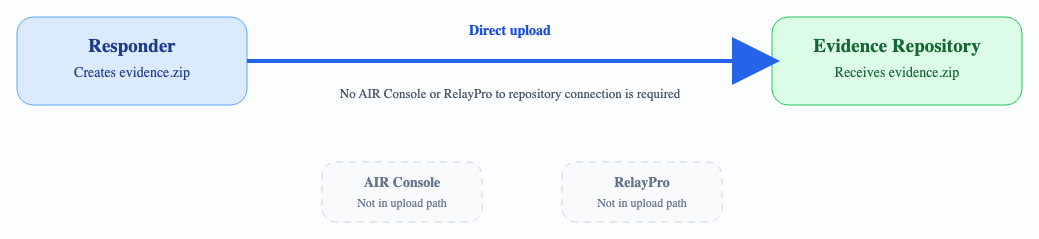
Evidence Acquisition Data Flow: Evidence upload direct to repository
Repository Browsing
Section titled “Repository Browsing”The AIR Console must be able to communicate with the Evidence Repository when users work with repository-backed features such as File Explorer and Repository Explorer.
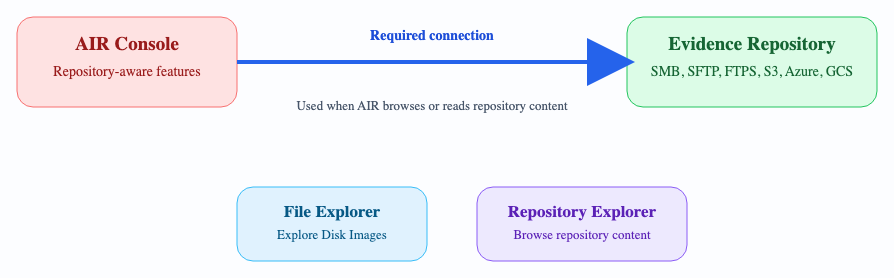
Evidence Acquisition Data Flow: Console repository browsing
For more information, see:
Off-Network Responder Data Flow
Section titled “Off-Network Responder Data Flow”The files described in this article are the same for off-network Responders, and the overall workflow is largely similar, with one key difference.
Because an off-network Responder has no network connectivity to the AIR Console, the collected data (case.ppc and Drone.zip) is not automatically transferred when the task is completed. You must import the collected data into AIR manually, as described in Import the Collected Data.
When evidence.zip is imported into AIR, the entire archive is not ingested, just as in the online Responder workflow. Instead, case.ppc and Drone.zip are extracted and imported.
When a user opens the Investigation Hub, the data from Case.db and Drone.db is imported into the AIR database and displayed in the Investigation Hub, the same as in the online workflow.
Frequently Asked Questions
Section titled “Frequently Asked Questions”What is the main difference between evidence.zip and case.ppc?
Section titled “What is the main difference between evidence.zip and case.ppc?”evidence.zip is the main evidence package created on the endpoint, while case.ppc is a smaller structured container used for AIR reporting and Investigation Hub workflows.
Why is case.ppc usually much smaller than evidence.zip?
Section titled “Why is case.ppc usually much smaller than evidence.zip?”case.ppc does not include all raw evidence artifacts. Large raw files such as Memory Dump or MFT Dump acquisitions are not embedded in it.
What is Drone.zip used for?
Section titled “What is Drone.zip used for?”Drone.zip stores DRONE or MITRE ATT&CK Analyzer findings and includes Drone.db, which is imported into the AIR database when the Investigation Hub is opened.
Are evidence.zip, case.ppc, and Drone.zip all sent to the Console?
Section titled “Are evidence.zip, case.ppc, and Drone.zip all sent to the Console?”No. The complete evidence.zip archive is not automatically sent to the AIR Console. The Console receives only case.ppc and Drone.zip.
When are Case.db and Drone.db imported into the database?
Section titled “When are Case.db and Drone.db imported into the database?”The import occurs when the Investigation Hub is opened from the Asset view, the Tasks menu, or the Cases menu. The Investigation Hub data is then displayed.
Does the Console or RelayPro need to connect to the Evidence Repository during Evidence Upload?
Section titled “Does the Console or RelayPro need to connect to the Evidence Repository during Evidence Upload?”No. During Evidence Upload, the Responder sends evidence.zip directly to the configured Evidence Repository. The AIR Console and RelayPro do not need to communicate with the Evidence Repository for this upload path.
When does the Console need connectivity to the Evidence Repository?
Section titled “When does the Console need connectivity to the Evidence Repository?”The AIR Console needs connectivity to the Evidence Repository for repository-backed features such as File Explorer and Repository Explorer. These workflows require AIR to browse or read content from the repository.
What happens if I delete an Acquisition Task from an asset?
Section titled “What happens if I delete an Acquisition Task from an asset?”When an Acquisition Task is deleted from an asset, the associated case.ppc and Drone.zip files are permanently removed from the AIR Console local disk and from the AIR database tables. The evidence.zip file remains in its original storage location, either on the endpoint’s local disk or in the configured Evidence Repository.
To remove a local evidence.zip file from the endpoint, use the Purge Local Data option under Task Actions. To delete evidence.zip from the Evidence Repository, remove it manually using your repository management access, because Evidence Repository maintenance is your responsibility.
Is access to the Evidence Repository required to display the Investigation Hub report?
Section titled “Is access to the Evidence Repository required to display the Investigation Hub report?”No. Neither the AIR Console nor the endpoint needs access to the Evidence Repository to display the Investigation Hub report. The report is generated from the data in case.ppc and Drone.zip, which the Responder sends directly to the Console when the task is completed.